---
title: Ackio Gateway Integration via FTP
description: Learn about the requirements for integrating an Ackio gateway via FTP to Proqio.
---
[Skip to content](https://help.proqio.com/ackio-gateway-integration-via-ftp#main-content)
[](https://help.proqio.com/?hsLang=en)
Open main navigation
Close main navigation
How can we help you?
- There are no suggestions because the search field is empty.
1. [Knowledge base](https://help.proqio.com/?hsLang=en)
2. [Getting started](https://help.proqio.com/getting-started?hsLang=en)
3. [Connectivity methods](https://help.proqio.com/getting-started?hsLang=en#connectivity-methods)
# Ackio Gateway Integration via FTP
## This article outlines the steps and requirements for integrating the Ackio Gateway with Proqio via FTP. Please follow the guidelines below to ensure a successful configuration.
### **Overview**
The **Ackio Gateway** is capable of transmitting data using various transfer protocols. However, for the purpose of this integration guide, we will focus specifically on the **FTP configuration**.
To ensure a successful FTP setup, specific permissions and naming conventions must be followed. Our Support team will assist in enabling access and ensuring proper configuration.
---
### FTP Integration Requirements
#### **1.** **Request FTP Permissions from Support**
Contact **Proqio Support** to request the following permissions
- **Full FTP permissions** for your gateway integration.
- **New file creation permissions** to ensure the gateway can upload fresh data files.
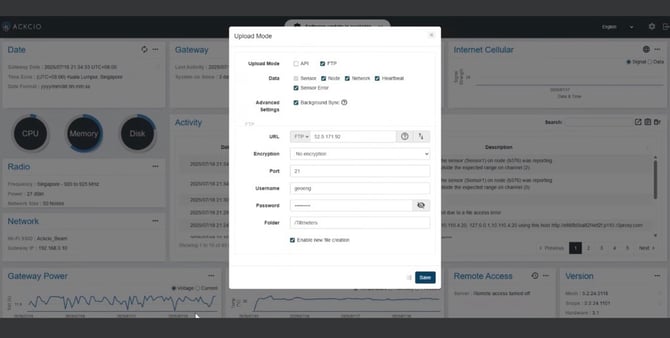
**Note:** These permissions are not granted by default and must be explicitly requested.
#### **2. Gateway Name Formatting**
When configuring the gateway for FTP, make sure the **gateway name does not include any spaces**.
✅ **Correct**: `AckioGateway01`
❌ **Incorrect**: `Ackio Gateway 01`
Using spaces in the gateway name can cause the integration to fail and the files to be unreadable by our system.
#### **3. File Delivery**
Once permissions are granted:
- Upload data files to the assigned FTP directory.
- Files should follow a consistent format for reliable processing.
- [Getting started](https://help.proqio.com/getting-started?hsLang=en#main-content)
- [Project details](https://help.proqio.com/getting-started?hsLang=en#project-details)
- [Teams and members](https://help.proqio.com/getting-started?hsLang=en#teams-and-members)
- [Account](https://help.proqio.com/getting-started?hsLang=en#account)
- [Configure Your Instruments](https://help.proqio.com/getting-started?hsLang=en#configure-your-instruments)
- [Notifications](https://help.proqio.com/getting-started?hsLang=en#notifications)
- [Connectivity methods](https://help.proqio.com/getting-started?hsLang=en#connectivity-methods)
- [Alerts](https://help.proqio.com/getting-started?hsLang=en#alerts)
- [Map](https://help.proqio.com/map?hsLang=en#main-content)
- [Tools](https://help.proqio.com/map?hsLang=en#tools)
- [Analysis](https://help.proqio.com/map?hsLang=en#analysis)
- [Monitoring](https://help.proqio.com/monitoring?hsLang=en#main-content)
- [Instruments](https://help.proqio.com/monitoring?hsLang=en#instruments)
- [Dashboard Creation & Configuration](https://help.proqio.com/dashboard-creation-configuration?hsLang=en#main-content)
- [Dashboards](https://help.proqio.com/dashboard-creation-configuration?hsLang=en#dashboards)
- [Report Creation](https://help.proqio.com/report-creation?hsLang=en)
- [New Feature Releases](https://help.proqio.com/new-feature-releases?hsLang=en)
- [Project Hierarchy](https://help.proqio.com/project-hierarchy?hsLang=en)
- [Analyse and Interpret your Data](https://help.proqio.com/analyse-and-interpret-your-data?hsLang=en)
- [Learn How to Navigate Proqio](https://help.proqio.com/learn-how-to-navigate-proqio?hsLang=en)
- [Configure Your Map View](https://help.proqio.com/configure-your-map-view?hsLang=en)
- [How to Add a Real Time Picture on Map](https://help.proqio.com/how-to-add-a-real-time-picture-on-map?hsLang=en)
- [Managing Your Data](https://help.proqio.com/managing-your-data?hsLang=en)
- [Uploading Records Manually](https://help.proqio.com/uploading-records-manually?hsLang=en#main-content)
- [Steps for uploading instrument data records manually](https://help.proqio.com/uploading-records-manually?hsLang=en#steps-for-uploading-instrument-data-records-manually)
- [ADA](https://help.proqio.com/ada?hsLang=en)
- [Digital Twin](https://help.proqio.com/digital-twin?hsLang=en)
- [Lines and Textures](https://help.proqio.com/lines-and-textures?hsLang=en)
[](http://www.proqio.com?hsLang=en)
Copyright © 2026, Proqio