---
title: Automated Outlier Detection & Management
description: Enhance data integrity and monitoring efficiency with Proqio’s Automated Outlier Detection and Management. Easily identify, filter, and recover abnormal readings in real time to keep your monitoring data clean, reliable, and audit-ready.
---
[Skip to content](https://help.proqio.com/automated-outlier-detection-management#main-content)
[](https://help.proqio.com/?hsLang=en)
Open main navigation
Close main navigation
How can we help you?
- There are no suggestions because the search field is empty.
1. [Knowledge base](https://help.proqio.com/?hsLang=en)
2. [New Feature Releases](https://help.proqio.com/new-feature-releases?hsLang=en)
# Automated Outlier Detection & Management
## This functionality empowers Proqio users to identify, manage, and respond to abnormal or critical deviations in their monitoring data. It ensures cleaner datasets, reduces noise in monitoring outputs, and enhances the reliability of early warning systems.
### **Why is this functionality useful?**
In large monitoring projects, sensor data can occasionally include sudden spikes, drops, or other anomalies caused by temporary interference, environmental conditions, or sensor drift. These outliers can obscure meaningful patterns and trigger unnecessary alerts.
With Automated Outlier Detection, Proqio helps you maintain high data integrity by automatically filtering and managing these anomalies in real time—so your graphs, dashboards, and alerts always reflect accurate conditions on the ground.
---
### **Feature Highlights**
#### **1. Automated Real-Time Outlier Detection**
- **Intelligent Filtering:** Proqio continuously scans incoming data inputs (e.g., displacement, temperature, pressure, chemical concentrations) and flags outliers in real time.
- **Customizable Setup:** Users can define and adjust acceptable data ranges and outlier rules for each instrument type directly within its configuration settings.
- **Automatic Deletion (Clean Graphs):** Any readings detected outside configured thresholds are automatically deleted, ensuring that your visualizations immediately reflect clean, reliable data.
#### **2. Comprehensive Logging and Visibility**
- **Centralized Outlier Logs:** Access a complete record of all automated outlier actions under **Monitoring \> Alerts**, maintaining full transparency.
- **Map Alert Integration:** Outlier events are visually represented in the **Alert Panel** on the map, offering instant, location-based context for abnormal readings.
#### **3. Data Recovery and Audit Trail**
- **Recovery Option:** All deleted readings are securely stored and can be viewed or restored from the **Logs** section, ensuring that no data is permanently lost.
- **Audit Trail:** Allows users to maintainin a verifiable record of every automatic deletion, enabling accountability and traceability for all outlier actions.
---
### **How does it work?**
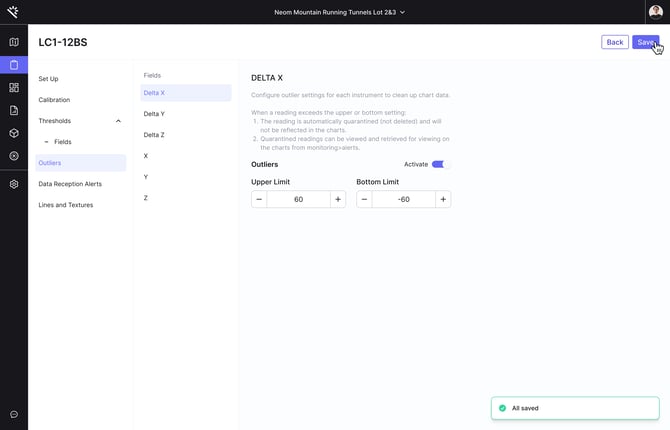
#### **Step 1: Configure Outlier Detection**
1. Open any **Instrument Setup** in your project.
2. Navigate to the **Alert** section.
3. Open the new **Outliers** page.
4. Set your upper and lower boundaries for acceptable readings.
#### **Step 2: Monitor and Manage Outlier Events**
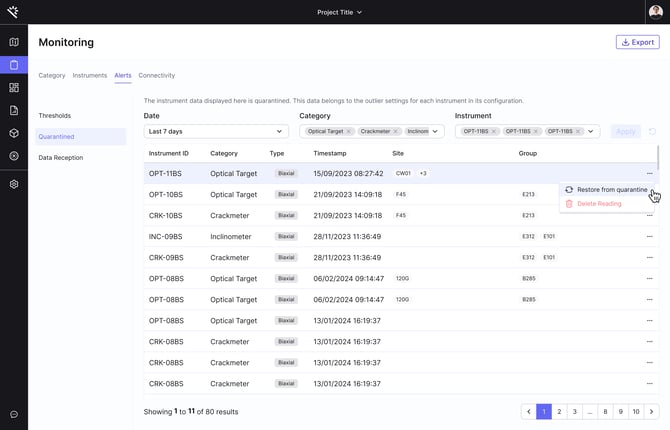
1. Go to the **Monitoring** section.
2. Open the **Alert** tab.
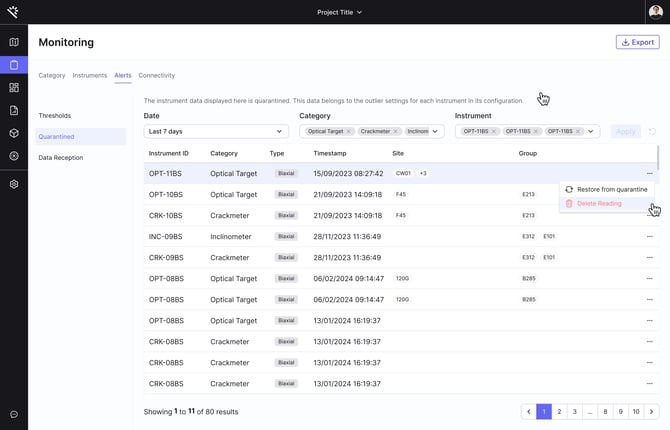
3. Review and manage **quarantine triggers**, where outlier readings are flagged or removed automatically.

4. To review past outlier events, restore deleted data or delete quarantined readings, access the **Logs** section.
- [Getting started](https://help.proqio.com/getting-started?hsLang=en#main-content)
- [Project details](https://help.proqio.com/getting-started?hsLang=en#project-details)
- [Teams and members](https://help.proqio.com/getting-started?hsLang=en#teams-and-members)
- [Account](https://help.proqio.com/getting-started?hsLang=en#account)
- [Configure Your Instruments](https://help.proqio.com/getting-started?hsLang=en#configure-your-instruments)
- [Notifications](https://help.proqio.com/getting-started?hsLang=en#notifications)
- [Connectivity methods](https://help.proqio.com/getting-started?hsLang=en#connectivity-methods)
- [Alerts](https://help.proqio.com/getting-started?hsLang=en#alerts)
- [Map](https://help.proqio.com/map?hsLang=en#main-content)
- [Tools](https://help.proqio.com/map?hsLang=en#tools)
- [Analysis](https://help.proqio.com/map?hsLang=en#analysis)
- [Monitoring](https://help.proqio.com/monitoring?hsLang=en#main-content)
- [Instruments](https://help.proqio.com/monitoring?hsLang=en#instruments)
- [Dashboard Creation & Configuration](https://help.proqio.com/dashboard-creation-configuration?hsLang=en)
- [Report Creation](https://help.proqio.com/report-creation?hsLang=en)
- [New Feature Releases](https://help.proqio.com/new-feature-releases?hsLang=en)
- [Project Hierarchy](https://help.proqio.com/project-hierarchy?hsLang=en)
- [Analyse and Interpret your Data](https://help.proqio.com/analyse-and-interpret-your-data?hsLang=en)
- [Learn How to Navigate Proqio](https://help.proqio.com/learn-how-to-navigate-proqio?hsLang=en)
- [Configure Your Map View](https://help.proqio.com/configure-your-map-view?hsLang=en)
- [How to Add a Real Time Picture on Map](https://help.proqio.com/how-to-add-a-real-time-picture-on-map?hsLang=en)
- [Managing Your Data](https://help.proqio.com/managing-your-data?hsLang=en)
- [Uploading Records Manually](https://help.proqio.com/uploading-records-manually?hsLang=en#main-content)
- [Steps for uploading instrument data records manually](https://help.proqio.com/uploading-records-manually?hsLang=en#steps-for-uploading-instrument-data-records-manually)
- [ADA](https://help.proqio.com/ada?hsLang=en)
- [Digital Twin](https://help.proqio.com/digital-twin?hsLang=en)
- [Lines and Textures](https://help.proqio.com/lines-and-textures?hsLang=en)
[](http://www.proqio.com?hsLang=en)
Copyright © 2026, Proqio